A complete offline restaurant management desktop app — billing, tables, staff, inventory, suppliers, cashier shifts, expenses, complaints, and reports, all in one Windows application.
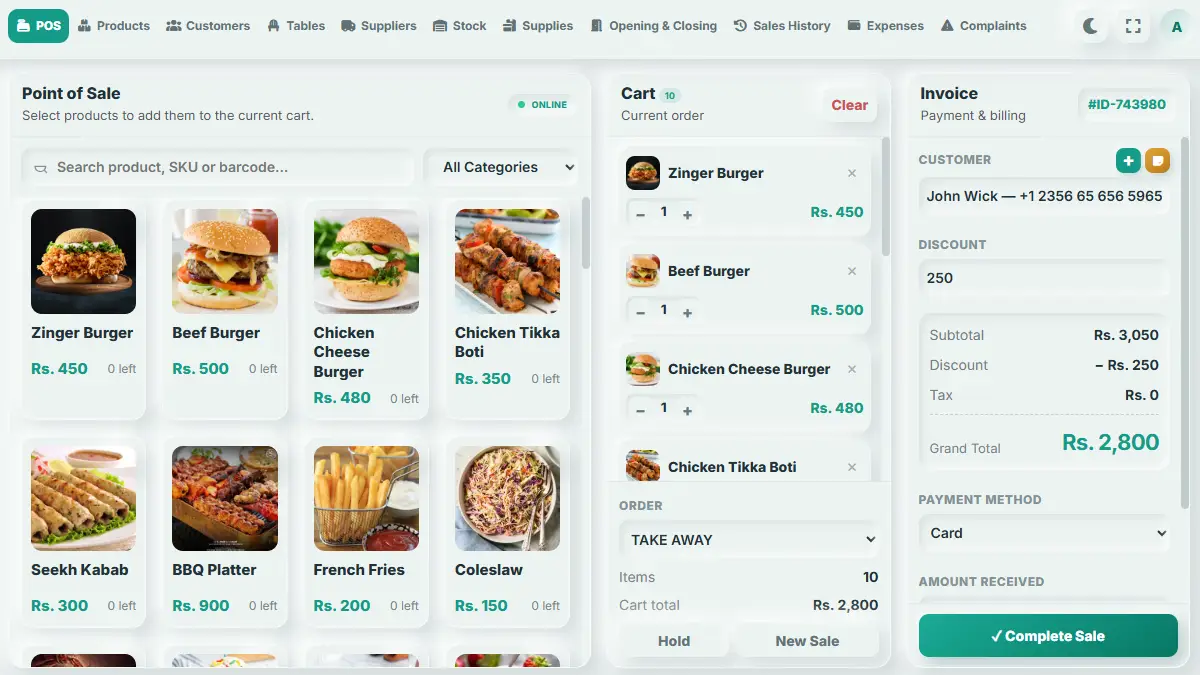
NTVISION Restaurant POS is a full-featured, offline-first Windows desktop application (Electron + a local SQLite database, secured with bcrypt password hashing) built to run every operational side of a restaurant from a single install — not just billing, but staffing, inventory, suppliers, cash handling, and customer service as well. Setup starts with a guided Setup Wizard: an owner creates the first admin account, activates a license key (verified online against the vendor's server, with a local fallback check when offline), configures the business profile, and optionally installs a starter product catalog for their type of restaurant. Once set up, two kinds of accounts can sign in: an Admin (full email/password login, with password-change and email-change flows, plus a password-reset request/verify flow) and Staff (fast PIN login with lockout protection after repeated failed attempts). Every staff account has granular, page-level permissions, so a cashier, a kitchen manager, and an owner can each see only the sections relevant to their role. The Billing screen is the operational core: build an order from the product catalog (including multi-item "Deals" bundled at a special price), apply per-product or whole-order discounts, attach a customer, and choose Dine In (linked to a specific table), Takeaway, or Delivery as the order type. Orders can be held (parked) and resumed later, and every finalized sale is stamped with a system-generated invoice number and linked to the active cashier shift and staff member who processed it. Completed sales can later be cancelled or refunded with a reason recorded against them. Restaurant floor management is handled through Apartments & Tables: the venue is divided into floors/sections (apartments), each holding numbered tables with a seating capacity and live status (available, occupied, reserved, etc.), and each table can be linked directly to its current held order for one-tap reopening. Inventory is tracked at two levels. Sellable Products (with SKU, category, supplier, price, stock quantity, minimum restock level, and either flat or percentage discounts) can carry multiple variants, each with its own price, discounted price, and stock. Every stock change — restocks, sales, adjustments — is logged in a stock-movement ledger tied to the responsible supplier and staff member. Separately, non-sale operational Supplies & Consumables (napkins, cleaning supplies, packaging, etc.) are tracked by unit, current stock, minimum restock level, and unit cost, with their own movement history. Suppliers are managed with contact details, an opening balance, and a full purchase history per supplier. Cash handling is built around Cashier Shifts: a staff member opens a shift with an opening cash amount and notes, all cash sales and manual cash movements (drops, pay-ins/pay-outs with a reason) are tracked against that shift, and closing the shift compares expected cash (calculated automatically) against the actual counted cash, recording any variance. A full shift history is kept for audit purposes. Front-of-house operations extend to Customers (contact info, customer type, opening balance, notes with timestamps, and full purchase history), Payment Methods (custom methods beyond cash — cards, mobile wallets, bank transfer — each with an icon, reference field, and a default flag, plus a "today's payment stats" summary), Expenses (categorized spending with vendor, payment method, date/time, reference, and status), and Complaints (customer complaints logged with category, priority, and status, assignable to staff, with a full threaded reply history per complaint for tracking resolution). Reporting covers sales history with exportable reports (PDF and image export) for accounting and record-keeping. Settings centralizes everything: shop branding (name, logo, phone, email, address, tax ID), receipt formatting (footer text, currency, date/time format), printer configuration (default printer, paper width, copies, auto-print, cash-drawer kick, customer copy), sale behavior toggles (confirm-before-sale, allow-negative-stock, low-stock alerts, require-customer-for-delivery), and license status. Data safety is built in with local backup export/import and configurable automatic backups, plus a "choose backup folder" option so shop owners control exactly where their data is protected. Every piece of data — staff, categories, customers, suppliers, products, deals, stock, supplies, payment methods, cashier shifts, sales, tables, expenses, and complaints — is fully manageable (add/update/remove/list) from within the app, with a self-migrating local database so new versions of the app never require a manual database upgrade step.
First-run flow to create the admin account, activate the license, configure the business profile, and optionally install a starter product catalog matched to the restaurant type.
Verifies the license key against the vendor's server when online, with a local demo-key fallback check when the network is unreachable.
Full email/password login for admins (with change-password, change-email, and password-reset flows) alongside fast PIN login for staff, with lockout protection after repeated failed PIN attempts.
Page-level access control per staff member, so each role only sees the sections of the app relevant to their job.
Build orders from the product catalog with per-item and whole-order discounts, attach a customer, and choose Dine In, Takeaway, or Delivery.
Create the admin account, activate your license key, and configure your business profile (name, logo, contact info, restaurant type).
Optionally install a starter product catalog for your restaurant type, or build your own categories, products, variants, and deals from scratch.
Add staff accounts with PIN logins and page permissions, set up your floors/tables, and configure payment methods and printer/receipt settings.
Start the day by opening a shift with a starting cash float before taking any sales.
Tell us about your restaurant and we'll help you get set up — usually within one business day.
Park an in-progress order and resume, update, or complete it later without losing the cart.
Organize the restaurant into floors/sections with numbered tables, seating capacity, and live occupancy status, each linkable to its current held order.
Organize sellable products by category, track SKU, supplier, price, stock, and minimum restock level.
Multiple variants per product (e.g. sizes/options), each with its own price, discounted price, and stock quantity.
Bundle multiple products or variants into a fixed-price deal for combo offers.
Add or edit many products at once instead of one at a time.
Every restock, sale, and adjustment is logged with quantity, cost, supplier, and staff member for full traceability.
Separately manage non-sale operational stock (packaging, cleaning supplies, etc.) by unit, current stock, minimum restock level, and cost, with its own movement history.
Track supplier contact details, opening balances, and a complete purchase history per supplier.
Store customer contact info, type, opening balance, timestamped notes, and full purchase history.
Configure payment options beyond cash (card, mobile wallet, bank transfer, etc.) with icons, reference fields, and a default method, plus a live "today's payments" summary.
Open a shift with a starting cash float, track all cash movements (drops, pay-ins/outs) during the shift, and close it with automatic expected-cash calculation versus actual counted cash.
Record manual cash in/out with a reason, and see any shortfall or surplus at shift close.
Cancel or refund a completed sale with a recorded reason, keeping an accurate sales history.
Every finalized sale is stamped with a system-generated invoice ID tied to the shift and staff member who processed it.
Log categorized business expenses with vendor, payment method, date/time, reference number, and payment status.
Log complaints with category, priority, and status, assign them to staff, and keep a threaded reply history until resolved.
Browse full sales history and export reports as PDF or image for accounting and record-keeping.
Set default printer, paper width, copy count, auto-print, cash-drawer trigger, and customer-copy printing.
Toggle confirm-before-sale prompts, allow/disallow negative stock, low-stock alerts, and whether a customer is required for delivery orders.
Configure shop name, logo, contact details, tax ID, receipt footer, currency, and date/time format.
Export and import a full local backup of the database, with a chosen backup folder and optional automatic backups.
The app automatically creates and updates its local SQLite schema on startup, so updates never require a manual database migration.
Billing, tables, inventory, staff, customers, suppliers, cashier shifts, expenses, and complaints all run against the local database without requiring an internet connection (only license activation/verification and the optional starter-catalog download need it).
Build orders in Billing for Dine In, Takeaway, or Delivery — attach a customer, apply discounts, hold orders as needed, and finalize the sale to generate an invoice.
Track stock movements as you restock products, manage supplies/consumables, and record supplier purchases.
Log day-to-day expenses and any customer complaints, assigning and resolving complaints through their reply thread.
At day's end, close the cashier shift — the system calculates expected cash automatically and records any variance against the actual count.
Check sales history and export reports as PDF or image, and export/schedule backups of your data for safekeeping.